
Organizations across various industries are increasingly relying on content management systems (CMS) to streamline operations, ensure effective collaboration, and manage large volumes of complex content. Among the top choices for businesses looking to achieve these goals is SharePoint CMS, a powerful tool developed by Microsoft. SharePoint is not just a simple document management system; it offers a comprehensive solution that adapts to the dynamic needs of modern organizations. With its ability to support large-scale, complex content management, facilitate seamless collaboration, and integrate with other Microsoft tools, SharePoint CMS stands as a critical platform for organizations aiming to optimize their workflows and content management strategies.
What is SharePoint CMS?
SharePoint CMS is a web-based content management system developed by Microsoft, designed to help organizations create, manage, and share content across their networks. Initially launched as a document management and collaboration tool, SharePoint has evolved into a comprehensive platform for content management, communication, and workflow automation.
Its key features include document storage, intranet capabilities, team collaboration, and customization options to suit the unique needs of various industries. With SharePoint CMS, organizations can manage everything from simple documents to complex digital content, facilitating smoother workflows and communication.
How SharePoint CMS Helps with Dynamic Solutions
One of the primary reasons SharePoint CMS is so widely adopted is its ability to provide dynamic solutions that adapt to an organization’s changing needs. In an age where business environments are continuously evolving, organizations require a CMS that can respond quickly to changes and scale as needed. SharePoint CMS excels in this area through several important features:
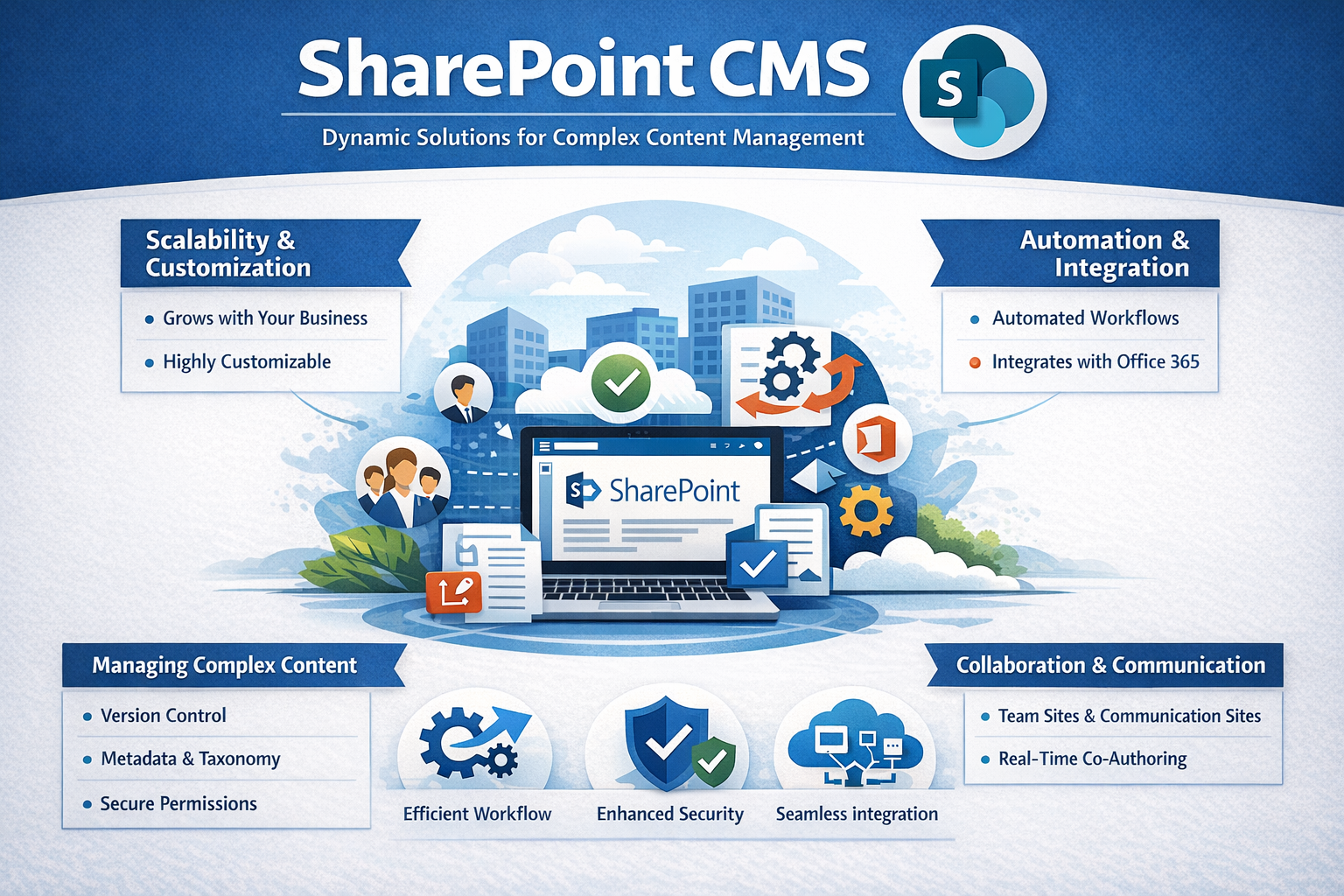
- Scalability: SharePoint CMS is scalable, meaning it can grow with your business. Whether you’re a small business or a large enterprise, SharePoint can handle the increasing volume of content and users. The platform can be tailored to accommodate an organization’s size, from a few users to thousands, and can easily scale to include additional features or capabilities.
- Customization: SharePoint offers high levels of customization. It allows organizations to tailor their CMS environment based on their specific requirements, whether that’s through web parts, custom workflows, or personalized branding. SharePoint’s ability to integrate with other Microsoft tools and third-party applications adds another layer of flexibility.
- Automation and Integration: SharePoint CMS supports automation through workflows, which can streamline processes such as approval chains, content publishing, and document management. By automating routine tasks, organizations can save time and reduce the risk of errors. Additionally, SharePoint integrates seamlessly with other Microsoft Office 365 tools, like Teams, Outlook, and OneDrive, ensuring that all systems work in harmony.
Managing Complex Content
In organizations that handle large volumes of complex content, managing and maintaining content can become a daunting task. SharePoint CMS helps simplify this process by offering robust content management capabilities that enable businesses to maintain order even when dealing with high levels of complexity. Here’s how:
- Version Control: SharePoint CMS provides built-in version control, which ensures that every iteration of a document or file is saved and easily retrievable. This feature is essential for organizations that need to maintain a record of changes and collaborate on documents without losing track of previous versions.
- Metadata and Taxonomy: SharePoint’s advanced metadata features allow organizations to categorize and tag content based on specific criteria. This makes it easier to search for and retrieve relevant content, even in large libraries. Effective metadata management helps streamline content organization and improve accessibility.
- Permissions and Security: SharePoint’s permission system is highly configurable, allowing organizations to control who has access to specific content. This level of granularity is particularly important when managing sensitive or confidential information. Organizations can assign different levels of access to various users, ensuring that only authorized personnel can view or edit certain documents.
- Content Approval: The content approval feature ensures that content goes through the proper channels before being published. This is particularly valuable for organizations with strict compliance requirements, as it ensures that all content meets the necessary standards before it’s made available to the public or internal teams.
Collaboration and Communication
Effective collaboration and communication are key components of a successful content management strategy. SharePoint CMS enables seamless collaboration across teams, departments, and even external partners. With SharePoint, users can work together in real-time, making it easier to share information and make decisions. Key collaboration features include:
- Team Sites: SharePoint allows users to create team sites for specific projects or departments. These sites act as central hubs where team members can store documents, track tasks, and collaborate on various projects. The real-time collaboration feature allows multiple users to work on the same document simultaneously, improving productivity.
- Communication Sites: SharePoint also offers communication sites, which are designed for broadcasting information to larger audiences. These sites allow organizations to create engaging content, such as news articles, announcements, and event calendars, to keep employees informed and connected.
- Integration with Microsoft Teams: As organizations increasingly rely on Microsoft Teams for communication, SharePoint’s deep integration with Teams helps unify internal collaboration efforts. Files shared in Teams can be directly accessed from SharePoint, and document collaboration features are synced seamlessly.
Overcoming SharePoint CMS Limitations
While SharePoint CMS offers numerous advantages, it is not without its limitations. Some users may find the platform’s interface to be complex, especially for non-technical users. Additionally, implementing SharePoint CMS can be resource-intensive, requiring significant time and expertise for setup and customization.
For example, SharePoint requires ongoing maintenance, and issues like system updates, performance tuning, and troubleshooting can become challenges for organizations without dedicated IT support. It’s also important to consider SharePoint CMS limitations, such as high upfront costs and potential integration issues with non-Microsoft tools.
Despite these limitations, many organizations find that the benefits far outweigh the drawbacks. With proper training, support, and strategic planning, organizations can overcome these challenges and make the most of SharePoint’s capabilities.
Conclusion
SharePoint CMS provides organizations with a flexible, scalable, and secure platform to manage dynamic solutions and complex content. Its powerful features, including customization options, version control, and real-time collaboration, make it an ideal choice for businesses looking to streamline operations and improve content management. While SharePoint CMS does come with some limitations, such as a complex interface and the need for significant IT resources, its robust features and integration with Microsoft’s ecosystem offer unparalleled value.
